



Every completed Shopify order is an opportunity to offer customers products they might need next. Easy Subscriptions’ Post-Checkout Upsell feature lets merchants A post-checkout upsell is an offer shown right after a customer completes checkout, letting them add a relevant product to their existing order in one click. Every completed Shopify order is an opportunity to offer customers something they might need next, and the best moment to ask is when the purchase is already done.
Easy Subscriptions’ Post-Checkout Upsell feature lets merchants suggest complementary products, add-ons or subscription upgrades immediately after checkout, without interrupting the original purchase. This helps merchants increase average order value (AOV) while giving customers a smooth, one-click experience. Accepted upsells are added to the original order, which keeps billing, fulfilment and inventory aligned.
Quick Answer: A post-checkout upsell is an offer shown right after a customer completes checkout, letting them add a relevant product to their existing order in one click. Because the purchase is already complete, it avoids checkout friction and can raise average order value. Keep offers relevant, simple and easy to accept.
Key takeaways
- Post-checkout upsells appear after payment, so they do not interrupt checkout.
- Relevant, low-friction offers work best: add-ons, accessories and subscription upgrades.
- Accepted upsells are added to the existing order, so there are no manual updates.
- Track impressions, acceptance rate, incremental revenue and AOV.
- Set offers up before BFCM, when order volume is highest.
What Is a Post-Checkout Upsell?
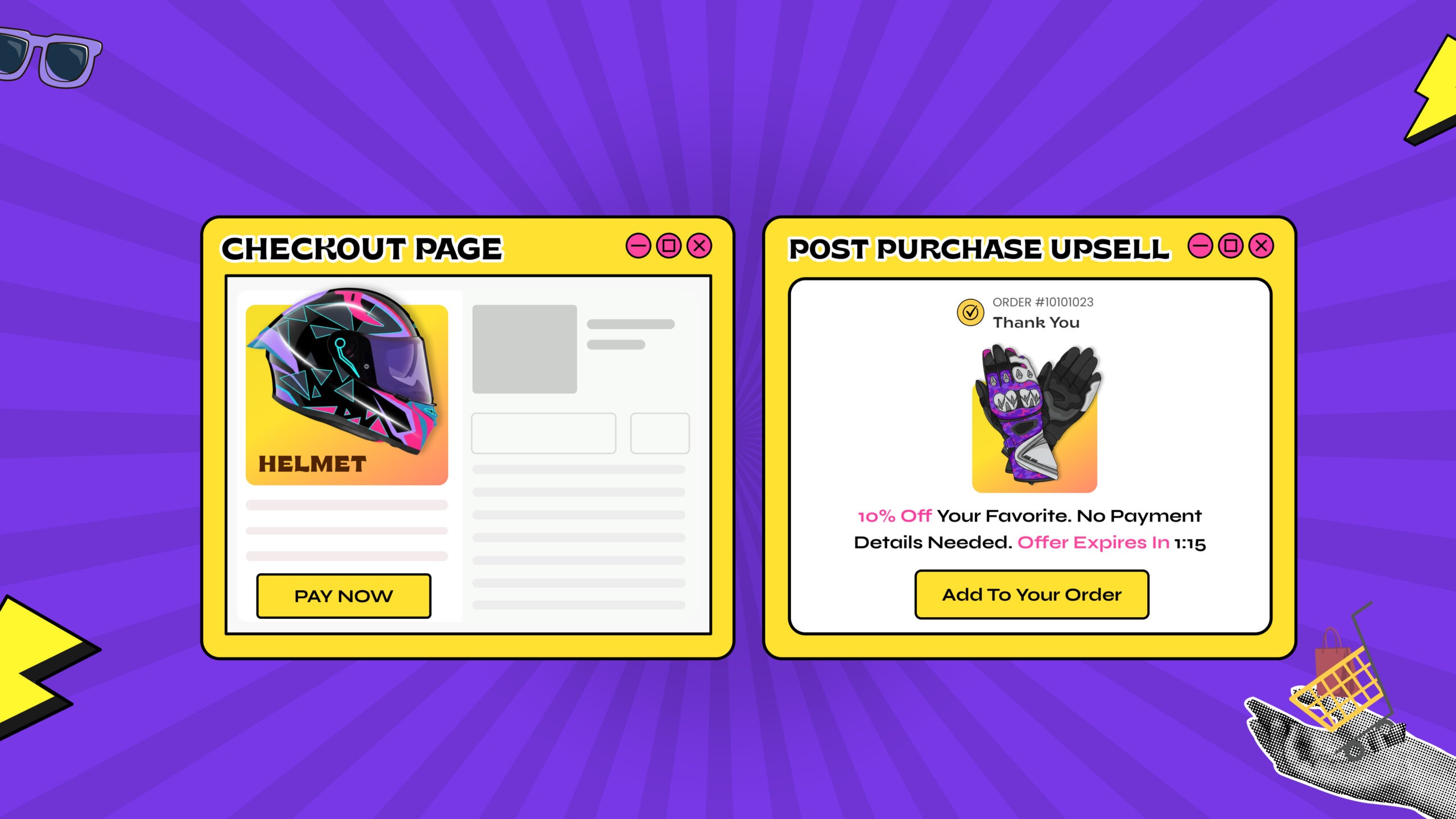
A post-checkout upsell (also called a post-purchase upsell) is a product offer displayed after a customer has paid, usually on a thank-you page or in a modal. The customer can add the item with one click, without re-entering payment details. Because the original purchase is already complete, the offer cannot cause the customer to abandon their cart.
Pre-Checkout vs Post-Checkout Upsells
| Factor | Pre-checkout upsell (pop-up or cart) | Post-checkout upsell |
| When it appears | Before the customer pays | After the customer pays |
| Risk to the sale | Can interrupt the flow and add friction | The sale is already complete |
| Customer mindset | Still deciding | Already in a buying frame of mind |
| Effort for the customer | May require more clicks | One click to add |
| Best for | Related items in the cart | Add-ons, accessories and subscription upgrades |
The two approaches can work together. Many stores use a light cart upsell and keep the post-checkout offer for the best-fitting add-on.
How Post-Checkout Upsells Work in Easy Subscriptions
Once a customer completes checkout, Easy Subscriptions triggers the upsell flow. A modal or thank-you page widget displays product suggestions based on what the customer purchased or their subscription type.
Merchants can pre-configure upsells using:
- Product tags or categories
- Subscription type (monthly, quarterly and so on)
- Order value
When customers click Add This to My Order, the upsell products are added to the existing order, and an updated order confirmation email can be sent if configured.
Example Scenario
A customer buys a coffee machine. After checkout, an upsell could suggest: Add compatible coffee pods to your order, one click and it is added automatically. There are no extra checkout steps and no interruptions, just a smooth chance to increase AOV.
Key Benefits of Post-Checkout Upsells
- Increase average order value: offer complementary products immediately after checkout, so you earn more per order without additional ad spend.
- Enhance the customer experience: upsells are non-intrusive and appear at a natural point, after the purchase.
- Simplify your workflow: accepted upsells are added to the original Shopify order, so no manual updates are required.
- Encourage repeat engagement: relevant add-ons or subscription upgrades help customers explore more of your range.
Another effective trigger is warranty registration. Apps like Dyrect allow brands to embed upsell offers directly on the product registration confirmation page. This approach helps merchants reach customers at a moment when they are already engaged and paying attention.
A Simple AOV Example (Illustrative)
Suppose your store has 1,000 orders a month at a $60 average order value. You add a $15 post-checkout offer, and 8% of customers accept it. That is 80 accepted offers, or $1,200 in extra revenue, which lifts AOV from $60 to $61.20 without any additional traffic. Even modest acceptance adds up across a busy month, and you can test different offers to improve it.
Upsell Ideas by Product Type
The right offer depends on what the customer just bought.
| Customer bought | Post-checkout offer | Why it fits |
| Coffee machine | Compatible coffee pods | Needed to use the product |
| Skincare cleanser | Matching moisturiser or SPF | Completes a routine |
| Pet food | Treats or a chew toy | Low-cost add-on for the same pet |
| Supplements | A larger size or complementary product | Extends supply and value |
| A one-time purchase | A subscription upgrade | Turns a single sale into recurring orders |
For more on building offers, see our guide to upsell and cross-sell tools, our roundup of the best Shopify upsell apps and our article on quantity-based bundles.
Setting Up Post-Checkout Upsells in Easy Subscriptions
Setup is straightforward:
- Open the Post-Checkout Upsell tab. Find it under the Feature tab in the Easy Subscriptions admin.
- Create a campaign. Define upsell triggers based on product purchases or subscription types.
- Add upsell products. Select one or more products to display immediately after checkout.
- Set display preferences. Choose the placement, such as the Thank-You Page (Post Checkout).
- Publish and track. Enable the upsell and monitor performance in the Easy Subscriptions dashboard.
- Place a test order. Check that the offer displays correctly and that an accepted upsell is added to the order and the confirmation email.
With just a few clicks, every checkout can become a new revenue opportunity.
Best Practices for Post-Checkout Upsells
- Keep offers relevant: suggest products that complement the original purchase.
- Use a clear call to action: buttons such as Add to My Order make acceptance simple.
- Keep the price proportionate: an add-on that costs a fraction of the original order feels easy to accept.
- Limit the choices: one or two offers convert better than a long list.
- Check the mobile layout: most shoppers will see the offer on a phone.
- Test and refine: try different products, prices and wording, and keep what works.
- Monitor performance: track impressions, conversions and incremental revenue.
Following these practices helps you maximize revenue without adding friction to the customer experience.
Using Post-Checkout Upsells to Grow Subscriptions
Because your store runs on Easy Subscriptions, post-checkout upsells can do more than raise order value. You can offer a subscription upgrade to a customer who has just made a one-time purchase, where the product suits repeat ordering, or suggest a complementary item to existing subscribers based on their subscription type. Pair these offers with retention management and bundles to keep new subscribers engaged.
Why Post-Checkout Upsells Matter
Traditional upsell pop-ups before checkout can interrupt the buying flow and risk cart abandonment. A post-checkout upsell avoids these issues:
- Zero disruption: checkout is complete before any upsell appears.
- Higher acceptance potential: customers are already in a buying frame of mind.
- Seamless integration: orders update automatically, keeping Shopify inventory and billing accurate.
Post-checkout upsells are a low-effort, high-impact strategy for Shopify merchants looking to grow revenue efficiently.
Metrics to Track
| Metric | What it tells you | Simple formula |
| Upsell impressions | How many customers saw the offer | Count of offers displayed |
| Acceptance rate | How often customers say yes | Offers accepted ÷ offers displayed × 100 |
| Incremental revenue | Extra revenue from upsells | Accepted offers × offer price |
| Average order value (AOV) | Whether upsells lift order size | Total revenue ÷ number of orders |
| Refund or cancellation rate | Whether offers are well matched | Refunded upsells ÷ accepted upsells × 100 |
View your results in a subscription analytics dashboard and compare AOV before and after launch.
Set It Up Before BFCM
Black Friday is November 27 and Cyber Monday is November 30, when order volume is at its highest. A well-matched post-checkout offer can turn some of that traffic into extra revenue, so set up and test your campaign before the rush. See our BFCM checklist for subscription stores and the BFCM playbook for more preparation tips.
Summary
The Post-Checkout Upsell feature in Easy Subscriptions helps Shopify merchants:
- Increase AOV without extra traffic
- Offer one-click upsells for a smooth customer experience
- Automate order updates and simplify workflows
Every checkout can become a revenue opportunity, helping you get more from existing customers while keeping fulfillment seamless.
Start using Easy Subscriptions today to unlock the full potential of post-checkout upsells on Shopify.