 AI-powered, Human-reviewed.





Why Meal Subscriptions Are Hard to Run on Shopify
Selling a meal subscription isn’t hard. Running one is.
The product is perishable, the logistics are time-sensitive, and customers expect a level of flexibility that most generic subscription setups can’t handle. The complexity isn’t in the food itself, it’s in the operational layer around it.
Here’s where most merchants run into trouble.
Cutoff Dates and Delivery Windows Fall Out of Sync
Meal subscriptions live and die by timing. Customers need to place or modify their order before a cutoff date so you can prep and ship on time.
Out-of-the-box Shopify billing doesn’t know about your kitchen’s prep schedule. If your billing cycle and your delivery window aren’t tightly linked, you end up charging customers for orders that can’t be fulfilled, or missing the window entirely.
The fix: You need a subscription app that lets you configure billing dates and delivery intervals independently, so a weekly box can bill on Monday, prep Tuesday, and ship Wednesday, every time.
Menu Rotation Becomes a Manual Nightmare
Most meal subscription brands rotate their menu weekly or monthly. That means the products in a subscriber’s upcoming order need to change, even if the subscription itself stays active.
Without proper tools, you’re manually editing hundreds of upcoming orders every week. One mistake and a customer gets last week’s menu, or worse, an out-of-stock item.
The fix: A subscription app with product swap functionality and the ability to update upcoming orders in bulk.
Failed Payments Kill Retention
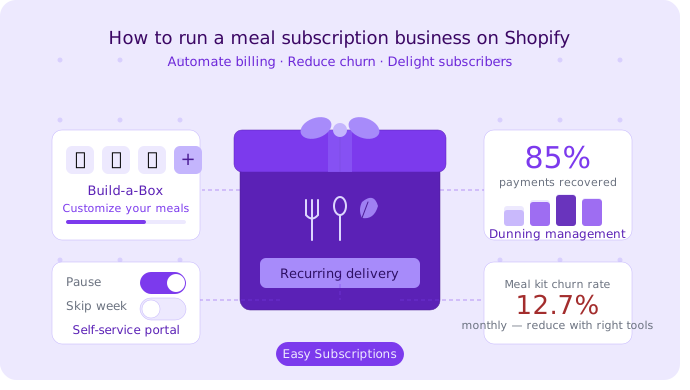
Meal kit subscriptions have the highest churn of any subscription category, sitting at 12.7% monthly according to industry data. A significant chunk of that is involuntary churn from failed payments.
Cards expire. Banks block recurring charges. Funds run low. None of these are your customer’s fault, and most of the time, they still want their box. Without dunning management (automated payment retry and recovery), those subscribers just disappear.
The fix: Automated retry logic with smart timing, paired with a clear email sequence that prompts customers to update their card before the subscription cancels.
Customers Can’t Self-Manage Their Box
Meal subscription customers are high-maintenance, in the best way. They travel. They have guests. They go on holiday. They want to skip a week, swap a meal, or pause for a month.
If they can’t do that themselves, they cancel. It’s that simple.
Without a dedicated customer portal, even simple subscription changes turn into support requests. At scale, that’s unsustainable.
What to Look for in a Shopify Meal Subscription App
Not all subscription apps for food brands are built the same. Most were designed for simple replenishment models (coffee, supplements, pet food) and bolt on food features as an afterthought.
Here’s what actually matters for a meal plan subscription app.
Flexible Billing and Delivery Intervals
You need to set billing frequency and delivery frequency independently. Weekly billing with bi-weekly delivery. Monthly billing with weekly delivery. Whatever your model requires.
Look for apps that support custom intervals, not just preset weekly/monthly options.
Build-a-Box (Let Customers Customize Their Meal)
Build-a-Box is the single most impactful feature for meal subscription retention. It lets customers choose which meals go in their box before each delivery.
Data backs this up: meal services that let customers select their own recipes or swap items show 15-25% better retention than fixed-box models. Customization creates ownership. Ownership reduces churn.
Dunning Management (Automated Payment Recovery)
Dunning management is the automated process of retrying failed payments and notifying customers to update their billing info.
A well-configured dunning system can recover 70-85% of failed payments, compared to just 40-50% with default retry logic. For a food subscription business with 500 active subscribers at $60/month and a 5% failure rate, that gap is worth thousands of dollars per month.
Look for configurable retry schedules, branded email sequences, and the ability to pause (not just cancel) subscriptions when all retries fail.
Customer Portal (Self-Service Pause, Skip, Swap)
A customer portal is a self-service dashboard where subscribers can manage their own subscription. Pause, skip, swap products, update their address, change delivery frequency, all without contacting support.
This is non-negotiable for meal subscriptions. Customers who can pause instead of cancel are far more likely to come back. The subscription management layer has to give them that control.
Loyalty and Retention Tools
Meal subscriptions are a habit product. The longer a customer stays, the more valuable they become. A built-in loyalty and rewards program keeps subscribers engaged between deliveries, rewards long-term commitment, and gives you a retention lever that doesn’t rely on discounts alone.
Look for tiered loyalty, points on recurring orders, and referral rewards.
How to Set Up a Meal Subscription Plan on Shopify (Step-by-Step)
Here’s how to get a food subscription on Shopify up and running with Easy Subscriptions. No developer needed.
Step 1: Install Easy Subscriptions
Go to the Shopify App Store and install Easy Subscriptions. There’s a free plan to start. Once installed, it connects directly to your Shopify admin and product catalog.
Setup takes under 30 minutes for a basic plan. If you’re migrating from another app (Recharge, Bold, Skio), Easy Subscriptions offers white-glove migration with no subscriber data loss.
Step 2: Create Your Subscription Plan
In the Easy Subscriptions dashboard, go to Subscription Plans and create a new plan.
Key settings to configure:
- Plan name (e.g., “Weekly Meal Box”)
- Products included (select from your Shopify catalog)
- Pricing (fixed price or discount off retail)
- Plan type (subscribe & save, prepaid, Build-a-Box)
Assign the plan to the relevant products. Subscribers will see the subscription option directly on your product pages.
Step 3: Configure Delivery Intervals
Set your billing frequency and delivery frequency. For a weekly meal box:
- Billing interval: Every 7 days
- Delivery interval: Every 7 days (or decouple if you batch deliveries)
You can also set order cutoff logic here. If your kitchen needs orders by Wednesday for a Friday delivery, configure the billing to trigger early enough to respect that window.
Step 4: Enable Build-a-Box for Meal Customization
In Easy Subscriptions, activate the Build-a-Box feature. This lets subscribers choose which items go in their upcoming box from a curated selection you define.
Set the rules:
- Minimum and maximum items per box
- Which products are available to choose from
- Whether customers can swap items after subscribing
This is the feature that turns a passive subscription into an active, engaged one.
Step 5: Set Up Dunning Rules for Failed Payments
Go to Dunning Settings in Easy Subscriptions and configure your retry logic.
A solid starting setup:
- Retry 1: 24 hours after failure
- Retry 2: 3 days after failure
- Retry 3: 7 days after failure
- Email 1: Friendly notice with a one-click card update link
- Email 2: Follow-up with urgency (“your box is at risk”)
- Email 3: Final notice before pause
Set the end-of-dunning action to pause, not cancel. Pausing keeps the subscriber in your system and makes reactivation far easier.
For more detail on building a recovery sequence, see the dunning guide.
Step 6: Launch Your Loyalty Program
Pair your subscription with Easy Loyalty & Rewards. Subscribers earn points on every recurring order, which they can redeem for free meals, discounts, or upgrades.
Set up a tiered structure (Silver, Gold, Diamond) based on total orders or spend. Long-term subscribers unlock better perks, which gives them a concrete reason to stay past the first 3 months, the highest-risk window for meal subscription churn.
See the full feature set at Easy Loyalty & Rewards.
Meal Subscription Models That Work on Shopify
Before you configure anything, decide which model fits your business. Each has different complexity, margin implications, and churn risk.
Fixed Meal Box (Same Items Every Week)
The simplest model. Every subscriber gets the same box on the same schedule. You control the menu entirely.
Best for: Brands with a small, curated menu. Meal prep services. Specialty diet boxes (keto, vegan, etc.).
Trade-off: Low operational complexity, but higher churn. Customers get bored. Menu rotation is essential.
Customizable Meal Box (Build-a-Box)
Subscribers choose their meals each week from a rotating selection. More complex to operate, but significantly better retention.
Best for: Brands with 8+ SKUs per cycle. Any merchant targeting engaged, health-conscious customers who care about variety.
Trade-off: Requires cutoff date management and a solid customer portal. Worth it.
Meal Kit Subscription (Ingredients + Recipe)
Customers receive pre-portioned ingredients and recipe cards. Think HelloFresh, but for your niche.
Best for: Cooking-focused brands. Premium positioning. Customers who want the experience, not just the food.
Trade-off: Highest fulfillment complexity. Ingredient sourcing, portioning, and packaging all need to be subscription-ready.
Prepaid Meal Plans (Pay Upfront, Deliver Weekly)
Customers pay for 4, 8, or 12 weeks upfront. You deliver weekly. Better cash flow, lower churn risk (they’ve already paid).
Best for: Fitness nutrition brands. Meal prep for specific goals (weight loss, muscle gain). Corporate wellness.
Trade-off: Higher friction at checkout. Works best with a strong value proposition and clear ROI for the customer.
Comparison Table
Model | Best For | Complexity | Avg. Churn Risk |
Fixed Meal Box | Small menus, niche diets | Low | High |
Customizable Box (Build-a-Box) | Variety-focused brands | Medium | Medium |
Meal Kit (Ingredients + Recipe) | Cooking-focused, premium | High | Medium-High |
Prepaid Meal Plans | Fitness, corporate wellness | Medium | Low |
Tips to Reduce Churn in Your Meal Subscription Business
Meal kit subscriptions have the highest churn of any subscription category. Here’s how to fight back.
- Rotate your menu regularly. Monotony is the #1 reason meal subscribers cancel. Update your menu weekly or bi-weekly, and announce upcoming meals in advance. Anticipation keeps subscribers engaged.
- Offer pause, not just cancel. When a subscriber hits friction (travel, budget, busy week), give them a pause option before they reach the cancel button. Subscribers who pause are far more likely to reactivate than those who cancel outright.
- Run a loyalty program tied to streaks. Reward subscribers for consecutive deliveries. “You’re 2 boxes away from a free meal” is a powerful retention hook. Use Easy Loyalty & Rewards to automate this.
- Fix failed payments before they become cancellations. Set up proactive pre-dunning emails 30 days before a card expires. Most involuntary churn is preventable. A well-configured dunning system recovers the majority of failed charges automatically.
- Create a feedback loop. Send a short post-delivery survey after the first 3 boxes. Ask what they loved, what they’d change. Customers who feel heard stay longer. Customers who feel ignored cancel.
- Make skipping frictionless. A subscriber who can skip in 2 clicks is a subscriber who doesn’t cancel. If skipping is buried or requires contacting support, they’ll cancel instead. Build skip into your subscription management portal prominently.
- Communicate delivery transparency. Send order confirmation emails with the exact delivery date, what’s in the box, and a link to make changes before cutoff. Surprises kill trust. Transparency builds it.
- Use win-back sequences. When a subscriber does cancel, don’t give up. Trigger an automated win-back email 7, 14, and 30 days after cancellation with a personalized offer. Cancelled subscribers who’ve already experienced your product are cheaper to reacquire than new customers.
Install the Easy Subscriptions app on your Shopify store today!